
8.2 KiB
Executable File
Socket.IO C++ Client
This repository contains the Socket.IO C++ client. It depends on websocket++ and is inspired by socket.io-clientpp.
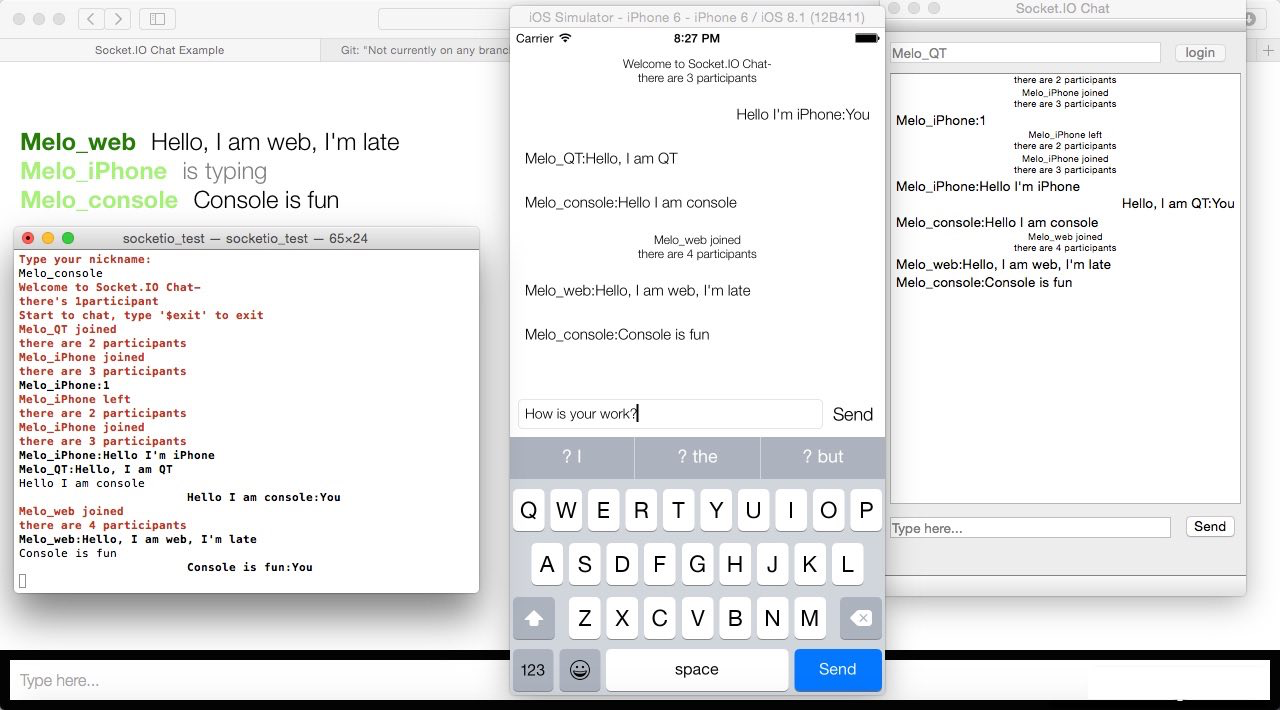
By virtue of being written in C++, this client works in several different platforms. The examples folder contains an iPhone, QT and Console example chat client!
Features
- 100% written in modern C++11
- Compatible with 1.0+ protocol
- Binary support
- Automatic JSON encoding
- Similar API to the Socket.IO JS client
How to use
- Install boost
- Use
git clone --recurse-submodules https://github.com/socketio/socket.io-client-cpp.gitto clone your local repo. - Include
websocket++,rapidjsonandsio_client.cpp,sio_packet.cpp,sio_socket.cpp,internal/sio_client_impl.cppin your project. - Include
sio_client.hwhere you want to use it. - Use
messageand its derived classes to compose complex text/binary messages.
API
Overview
There're just 3 roles in this library - socket,client and message.
client is for physical connection while socket is for "namespace"(which is like a logical channel), which means one socket paired with one namespace, and one client paired with one physical connection.
Since a physical connection can have multiple namespaces (which is called multiplex), a client object may have multiple socket objects, each is bind to a distinct namespace.
Use client to setup the connection to the server, manange the connection status, also session id for the connection.
Use socket to send messages under namespace and receives messages in the namespace, also handle special types of message.
The message is just about the content you want to send, with text,binary or structured combinations.
Socket
Constructors
Sockets are all managed by client, no public constructors.
You can get it's pointer by client.socket(namespace).
Event Emitter
void emit(std::string const& name, std::string const& message)
void emit(std::string const& name, std::string const& message, std::function<void (message::ptr const&)> const& ack)
Emit a plain text message, along with event's name and a optional ack callback function if you need server ack.
void emit(std::string const& name, message::ptr const& args)
void emit(std::string const& name, message::ptr const& args, std::function<void (message::ptr const&)> const& ack)
Emit a message (explained below) object, along with event's name and a optional ack callback function if you need server ack.
void emit(std::string const& name, std::shared_ptr<const std::string> const& binary_ptr)
void emit(std::string const& name, std::shared_ptr<const std::string> const& binary_ptr, std::function<void (message::ptr const&)> const& ack)
Emit a single binary buffer, along with event's name and a optional ack callback function if you need server ack.
Event Bindings
void on(std::string const& event_name,event_listener const& func)
void on(std::string const& event_name,event_listener_aux const& func)
Bind a callback to specified event name. Same as socket.on() function in JS, event_listener is for full content event object,event_listener_aux is for convinience.
void off(std::string const& event_name)
Unbind the event callback with specified name.
void off_all()
Clear all event bindings (not including the error listener).
void on_error(error_listener const& l)
Bind the error handler for socket.io error messages.
void off_error()
Unbind the error handler.
    //event object:
    class event
    {
    public:
        const std::string& get_nsp() const;

        const std::string& get_name() const;

        const message::ptr& get_message() const;

        bool need_ack() const;

        void put_ack_message(message::ptr const& ack_message);

        message::ptr const& get_ack_message() const;
       ...
    };
    //event listener declare:
    typedef std::function<void(const std::string& name,message::ptr const& message,bool need_ack, message::ptr& ack_message)> event_listener_aux;

    typedef std::function<void(event& event)> event_listener;

    typedef std::function<void(message::ptr const& message)> error_listener;
Connect and close socket
connect will happen for existing sockets automatically when client have opened up the physical connection.
socket opened with connected client will connect to its namespace immediately.
void close()
Positively disconnect from namespace.
Get name of namespace
std::string const& get_namespace() const
Get current namespace name which the client is inside.
Client
Constructors
client() default constructor.
Connection Listeners
void set_open_listener(con_listener const& l)
Call when websocket is open, especially means good connectivity.
void set_fail_listener(con_listener const& l)
Call when failed in connecting.
void set_close_listener(close_listener const& l)
Call when closed or drop. See client::close_reason
//connection listener declare:
enum close_reason
{
    close_reason_normal,
    close_reason_drop
};
typedef std::function<void(void)> con_listener;

typedef std::function<void(close_reason const& reason)> close_listener;
Socket listeners
void set_connect_listener(socket_listener const& l)
Set listener for socket connect event, called when any sockets being ready to send message.
void set_close_listener(socket_listener const& l)
Set listener for socket close event, called when any sockets being closed, afterward, corresponding socket object will be cleared from client.
    //socket_listener declare:
    typedef std::function<void(std::string const& nsp)> socket_listener;
Connect and Close
void connect(const std::string& uri)
Connect to socket.io server, eg. client.connect("ws://localhost:3000");
void reconnect(const std::string& uri)
Try to reconnect with original session id. If fail listener triggered, means your session id is already expired, do not keep reconnect again.
void close()
Close the client, return immediately.
void sync_close()
Close the client, return until it is really closed.
bool opened() const
Check if client's connection is opened.
Namespace
socket::ptr socket(std::string const& nsp)
Get a pointer to a socket which is paired with the specified namespace.
Session ID
std::string const& get_sessionid() const
Get socket.io session id.
Message
message Base class of all message object.
int_message message contains a 64-bit integer.
double_message message contains a double.
string_message message contains a string.
array_message message contains a vector<message::ptr>.
object_message message contains a map<string,message::ptr>.
message::ptr pointer to message object, it will be one of its derived classes, judge by message.get_flag().
All designated constructor of message objects is hidden, you need to create message and get the message::ptr by [derived]_message:create().
Boost setup
-
Download boost from boost.org.
-
Unpack boost to some place.
-
Run either .\bootstrap.bat (on Windows), or ./bootstrap.sh (on other operating systems) under boost folder.
Boost build (Build the necessary subset only)
Windows:
Run with following script will build the necessary subset:
bjam stage --toolset=msvc --with-system --with-date_time --with-random --stagedir="release" link=static runtime-link=shared threading=multi release
Optionally You can merge all output .lib files into a fat one, in output folder, run:
lib.exe /OUT:boost.lib *
iOS and OSX
Use this shell to download and build boost completely automattically.
Add boost source folder to your header search path, and add static libs to link option.
##License BSD