mirror of
https://github.com/socketio/socket.io-client-cpp.git
synced 2026-06-10 20:36:14 +00:00

247 lines
8.2 KiB
Markdown
Executable File
247 lines
8.2 KiB
Markdown
Executable File
# Socket.IO C++ Client
|
|
|
|
This repository contains the Socket.IO C++ client. It depends on [websocket++](https://github.com/zaphoyd/websocketpp) and is inspired by [socket.io-clientpp](https://github.com/ebshimizu/socket.io-clientpp).
|
|
|
|
By virtue of being written in C++, this client works in several different platforms. The [examples](https://github.com/socketio/socket.io-client-cpp/tree/master/examples) folder contains an iPhone, QT and Console example chat client!
|
|
|
|
[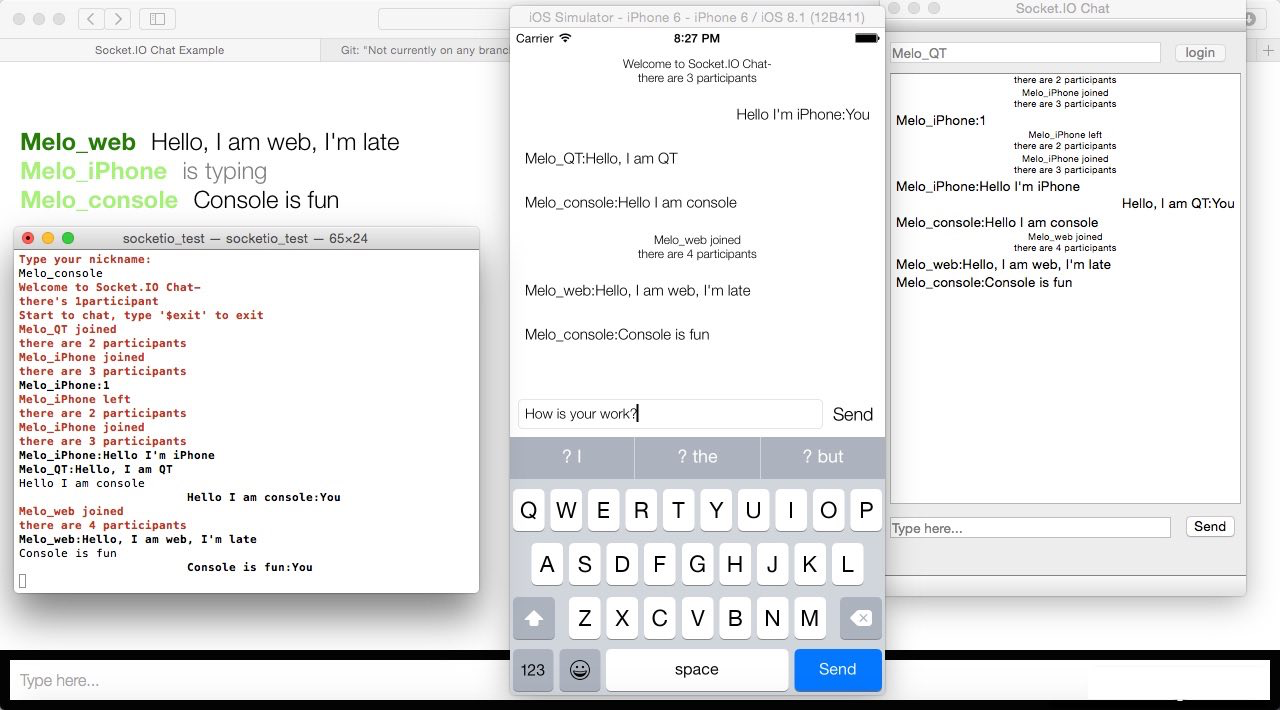](https://github.com/socketio/socket.io-client-cpp/tree/master/examples)
|
|
|
|
## Features
|
|
|
|
- 100% written in modern C++11
|
|
- Compatible with 1.0+ protocol
|
|
- Binary support
|
|
- Automatic JSON encoding
|
|
- Similar API to the Socket.IO JS client
|
|
|
|
## How to use
|
|
|
|
1. Install boost
|
|
2. Use `git clone --recurse-submodules https://github.com/socketio/socket.io-client-cpp.git` to clone your local repo.
|
|
3. Include `websocket++`, `rapidjson` and `sio_client.cpp`,`sio_packet.cpp`,`sio_socket.cpp`,`internal/sio_client_impl.cpp` in your project.
|
|
4. Include `sio_client.h` where you want to use it.
|
|
5. Use `message` and its derived classes to compose complex text/binary messages.
|
|
|
|
## API
|
|
### *Overview*
|
|
There're just 3 roles in this library - `socket`,`client` and `message`.
|
|
|
|
`client` is for physical connection while `socket` is for "namespace"(which is like a logical channel), which means one `socket` paired with one namespace, and one `client` paired with one physical connection.
|
|
|
|
Since a physical connection can have multiple namespaces (which is called multiplex), a `client` object may have multiple `socket` objects, each is bind to a distinct `namespace`.
|
|
|
|
Use `client` to setup the connection to the server, manange the connection status, also session id for the connection.
|
|
|
|
Use `socket` to send messages under namespace and receives messages in the namespace, also handle special types of message.
|
|
|
|
The `message` is just about the content you want to send, with text,binary or structured combinations.
|
|
|
|
### *Socket*
|
|
#### Constructors
|
|
Sockets are all managed by `client`, no public constructors.
|
|
|
|
You can get it's pointer by `client.socket(namespace)`.
|
|
|
|
#### Event Emitter
|
|
`void emit(std::string const& name, std::string const& message)`
|
|
|
|
`void emit(std::string const& name, std::string const& message, std::function<void (message::ptr const&)> const& ack)`
|
|
|
|
Emit a plain text message, along with event's name and a optional ack callback function if you need server ack.
|
|
|
|
`void emit(std::string const& name, message::ptr const& args)`
|
|
|
|
`void emit(std::string const& name, message::ptr const& args, std::function<void (message::ptr const&)> const& ack)`
|
|
|
|
Emit a `message` (explained below) object, along with event's name and a optional ack callback function if you need server ack.
|
|
|
|
`void emit(std::string const& name, std::shared_ptr<const std::string> const& binary_ptr)`
|
|
|
|
`void emit(std::string const& name, std::shared_ptr<const std::string> const& binary_ptr, std::function<void (message::ptr const&)> const& ack)`
|
|
|
|
Emit a single binary buffer, along with event's name and a optional ack callback function if you need server ack.
|
|
|
|
#### Event Bindings
|
|
`void on(std::string const& event_name,event_listener const& func)`
|
|
|
|
`void on(std::string const& event_name,event_listener_aux const& func)`
|
|
|
|
Bind a callback to specified event name. Same as `socket.on()` function in JS, `event_listener` is for full content event object,`event_listener_aux` is for convinience.
|
|
|
|
`void off(std::string const& event_name)`
|
|
|
|
Unbind the event callback with specified name.
|
|
|
|
`void off_all()`
|
|
|
|
Clear all event bindings (not including the error listener).
|
|
|
|
`void on_error(error_listener const& l)`
|
|
|
|
Bind the error handler for socket.io error messages.
|
|
|
|
`void off_error()`
|
|
|
|
Unbind the error handler.
|
|
|
|
```C++
|
|
|
|
//event object:
|
|
class event
|
|
{
|
|
public:
|
|
const std::string& get_nsp() const;
|
|
|
|
const std::string& get_name() const;
|
|
|
|
const message::ptr& get_message() const;
|
|
|
|
bool need_ack() const;
|
|
|
|
void put_ack_message(message::ptr const& ack_message);
|
|
|
|
message::ptr const& get_ack_message() const;
|
|
...
|
|
};
|
|
//event listener declare:
|
|
typedef std::function<void(const std::string& name,message::ptr const& message,bool need_ack, message::ptr& ack_message)> event_listener_aux;
|
|
|
|
typedef std::function<void(event& event)> event_listener;
|
|
|
|
typedef std::function<void(message::ptr const& message)> error_listener;
|
|
|
|
```
|
|
|
|
#### Connect and close socket
|
|
`connect` will happen for existing `socket`s automatically when `client` have opened up the physical connection.
|
|
|
|
`socket` opened with connected `client` will connect to its namespace immediately.
|
|
|
|
`void close()`
|
|
|
|
Positively disconnect from namespace.
|
|
|
|
#### Get name of namespace
|
|
`std::string const& get_namespace() const`
|
|
|
|
Get current namespace name which the client is inside.
|
|
|
|
### *Client*
|
|
#### Constructors
|
|
`client()` default constructor.
|
|
|
|
#### Connection Listeners
|
|
`void set_open_listener(con_listener const& l)`
|
|
|
|
Call when websocket is open, especially means good connectivity.
|
|
|
|
`void set_fail_listener(con_listener const& l)`
|
|
|
|
Call when failed in connecting.
|
|
|
|
`void set_close_listener(close_listener const& l)`
|
|
|
|
Call when closed or drop. See `client::close_reason`
|
|
|
|
```C++
|
|
//connection listener declare:
|
|
enum close_reason
|
|
{
|
|
close_reason_normal,
|
|
close_reason_drop
|
|
};
|
|
typedef std::function<void(void)> con_listener;
|
|
|
|
typedef std::function<void(close_reason const& reason)> close_listener;
|
|
```
|
|
#### Socket listeners
|
|
`void set_connect_listener(socket_listener const& l)`
|
|
|
|
Set listener for socket connect event, called when any sockets being ready to send message.
|
|
|
|
`void set_close_listener(socket_listener const& l)`
|
|
|
|
Set listener for socket close event, called when any sockets being closed, afterward, corresponding `socket` object will be cleared from client.
|
|
|
|
```C++
|
|
//socket_listener declare:
|
|
typedef std::function<void(std::string const& nsp)> socket_listener;
|
|
```
|
|
|
|
#### Connect and Close
|
|
`void connect(const std::string& uri)`
|
|
|
|
Connect to socket.io server, eg. `client.connect("ws://localhost:3000");`
|
|
|
|
`void reconnect(const std::string& uri)`
|
|
|
|
Try to reconnect with original session id. If `fail listener` triggered, means your session id is already expired, do not keep reconnect again.
|
|
|
|
`void close()`
|
|
|
|
Close the client, return immediately.
|
|
|
|
`void sync_close()`
|
|
|
|
Close the client, return until it is really closed.
|
|
|
|
`bool opened() const`
|
|
|
|
Check if client's connection is opened.
|
|
|
|
#### Namespace
|
|
`socket::ptr socket(std::string const& nsp)`
|
|
|
|
Get a pointer to a socket which is paired with the specified namespace.
|
|
|
|
#### Session ID
|
|
`std::string const& get_sessionid() const`
|
|
|
|
Get socket.io session id.
|
|
|
|
### *Message*
|
|
`message` Base class of all message object.
|
|
|
|
`int_message` message contains a 64-bit integer.
|
|
|
|
`double_message` message contains a double.
|
|
|
|
`string_message` message contains a string.
|
|
|
|
`array_message` message contains a `vector<message::ptr>`.
|
|
|
|
`object_message` message contains a `map<string,message::ptr>`.
|
|
|
|
`message::ptr` pointer to `message` object, it will be one of its derived classes, judge by `message.get_flag()`.
|
|
|
|
All designated constructor of `message` objects is hidden, you need to create message and get the `message::ptr` by `[derived]_message:create()`.
|
|
|
|
## Boost setup
|
|
* Download boost from [boost.org](http://www.boost.org/).
|
|
|
|
* Unpack boost to some place.
|
|
|
|
* Run either .\bootstrap.bat (on Windows), or ./bootstrap.sh (on other operating systems) under boost folder.
|
|
|
|
## Boost build (Build the necessary subset only)
|
|
|
|
#### Windows:
|
|
Run with following script will build the necessary subset:
|
|
|
|
```bash
|
|
bjam stage --toolset=msvc --with-system --with-date_time --with-random --stagedir="release" link=static runtime-link=shared threading=multi release
|
|
```
|
|
Optionally You can merge all output .lib files into a fat one, in output folder, run:
|
|
|
|
```bash
|
|
lib.exe /OUT:boost.lib *
|
|
```
|
|
|
|
#### iOS and OSX
|
|
Use this [shell](https://github.com/socketio/socket.io-client-cpp/blob/master/examples/iOS/SioChatDemo/boost/boost.sh) to download and build boost completely automattically.
|
|
|
|
#### Add boost source folder to your `header search path`, and add static libs to link option.
|
|
|
|
##License
|
|
BSD
|